Wednesday, March 28, 2012

Monday, March 19, 2012
When automated tests make sense, and when they don't
Some years ago, I stumbled upon an article about automated testing, "When should a test be automated?" (I'm linking to Google since my previous link is now broken). I found it quite interesting because it, unaffected by all the hype surrounding automated tests, provided some rational guidelines for when to write automated tests and when not to.
A main principle was that an automated test is a waste of time if it doesn't find a real bug upon being run again.
This is a good thing to keep in mind, but since we generally don't know where the bugs are or will be in the future, it's not a very practical rule. So on and off, while working on various web applications, I've been thinking about this.
Why automated tests are good
Praises of automated tests are not hard to find. But briefly: the main practical advantage is that if you change the software, you can easily rerun the tests to see if you have broken something, compared to having to retest everything manually (or just crossing your fingers). If you test the same things over and over again, having it automated can be a real time saver.
There is also a psychological advantage; writing and running the tests make you feel better. Plus you're in, which is always a good thing if you're a little low on the hype factor.
Why automated tests are bad
However, there are also some downsides.
First of all, automating tests takes time.
And unfortunately, it's usually a pretty boring task. It doesn't help that you often have to test things manually too while experimenting or as a sanity check, so you pay the cost of testing twice.
And the tests, while radiating nice comforting feelings, also have a tendency to give a false sense of security. The tests are running, so it works, right?
So you always have to keep in mind that automated tests only test part of what makes the code correct. You could argue that this is a sign of a too lazy test writer, I think that's the main driver in test-driven development, but really, you can't foresee everything (pesky user clicks the wrong button), and if you try to, you end up with so detailed tests that you can't change the program without having to the rewrite the tests completely. And then they have lost their main automated advantage.
Besides, an automated test only confirms what you already suspect, it doesn't tell you if the software is creating real value for its users. So you still need human testing.
Furthermore, even if you don't test everything, in my experience you still end up with a large amount of test code, as much or more as the actual program. There's a hidden cost in this; many changes to the program will also require adapting the tests. In other words, code maintenance take longer. People don't think about this, but imagine you show me 100 lines of your code, and I told you I could reduce it to 40 lines with no ill effects on readability or performance? Would you take that? What if those 60 lines I take away are your tests?
The trade-off
With the understanding that automated tests have good and bad sides, if you value your time, you should evaluate the situation on a scale from should-automate to should-not-waste-time-automating.
Circumstances pro automation
Hard to setup tests. If you have to go through ten steps to be able to test a small change, testing quickly becomes a tedious chore. Usual issues in web applications are getting test data prepared, or being able to intercept email sent by the system, or testing error scenarios.
Important corner cases. Testing manually that a new button does the right thing is not tedious. But it is tedious if you have to try 20 different combinations of inputs to see they all work.
Team of disparate people touching the code. Most code have some implicit assumptions that cause bugs if violated. When multiple persons are modifying it, there's a greater chance of bugs, and smaller chance that each remembers all the corner cases that need to work. Note that you don't necessarily need more than one person on the development team to fall into this category. Add a gap of a year or two in the development, and most people will have happily forgotten the pecularities of the project in the meantime.
Complex code. If the code is complex, it's likely to be needing bug fixes that don't change the expected output, which is good because then we don't have to change the tests, and it's also likely that it's harder to see what the expected output is supposed to be, which can be conveniently solved by writing it down in a test.
The code is seeing changing input data. Modifications to complex code is one source of bugs, but another is changes in the input data. You test it today, and it works fine, but tomorrow your data source decides life is too quiet and changes something that violates your assumptions about the input. Again, this requires bug fixes that usually don't change the expected output.
The code is an API with no UI. If there's no UI, you need to write code to test it, and then you might as well automate it anyway. With Python or any other language with a REPL, this is not entirely true, though. I often test small snippets I'm not yet confident are bug-free in the interpreter.
Circumstances tipping the scales toward manual tests
Simple, easy-to-follow code. If it's simple, there are fewer opportunities for bugs and thus a greater chance automation will be a waste of time. For instance, code using templates to spit out HTML is in most cases trivial, a div here, a heading there. You could add a test to find out whether the div and the heading are there, but it's trivial to see that by mere inspection, and if you've checked the way they look in the browser, there's little chance they're magically going to disappear later.
Localized changes. If changes only affect things in their near vicinity and have no impact on the rest of the software, it's easy to test them manually. For example, consider a web application made up of several independent pages. When you're working on one page, you can just reload it to check it's fine and ignore the rest of the program.
Manual tests are simple to set up. If all it takes to run the test is a reload in the browser, the relative cost of automation is high.
Hard-to-quantify issues are important. If look and feel are important, there's currently no substitute for a human. Imagine setting up a test for an animation - how do you test should look good?
The functionality sees lots of changes and experiments. If the functionality of the software keeps changing, maintaining a set of automated tests is a burden and is more likely to turn you into the grumpy nay-saying change-resistant bastard it's important not to be.
The software sees no changes. If nothing changes, there's little opportunity for bugs and little opportunity for rerunning a set of automated tests. This situation sounds strange, but actually in my experience there's a certain polarity in software maintenance; some things change all the time, others are truly write-once. Of course, this observation doesn't help a lot when you're starting on a project and don't know where it's going to end.
Only one person. Again, this is an important special case. If there's only one person working on a given piece of software (or perhaps module), that person is likely to know exactly what needs to be tested, diminishing the value of a broad test suite.
Minor errors are not critical. This sounds sloppy, but in reality with many web sites, it creates more value for the users and customers if you focus on having the major paths hit the target than being 100% correct because errors outside the major paths can be fixed quickly when discovered.
Of course, most of the above points aren't independent. For example, say you're writing a little script to convert your music collection into a standard format. In that case, you're the only developer, you're going to experiment and change the script until you're happy, an error is not critical since you're around to supervise the process, and you don't expect the script to run more than once when it's finished. Would you write automated tests for that script?
Unit testing versus acceptance testing
I have an extra remark regarding the level at which the tests are performed. There's been a lot of talk about unit testing, in fact most automated test frameworks are called unit testing frameworks, but the reality is that unit tests represent little any end-user value in themselves because they are just providing evidence that some component that nobody will ever run by itself is working if it is being run by itself in the lab.
A more appropriate level for end users is acceptance test where you are testing requirements to the system itself. For instance, the site should enable authorized users to add new products which should then show on this page or when a customer pays for some goods, an order should show up in the system. These are the kind of things that when failing will be sure to cause trouble for the users and thus you.
Of course, unit tests can add value indirectly by highlighting bugs early in the process where they are easier and thus cheaper to debug.
So where are we?
In my experience, when it comes to web development, there are some instances where unit tests make sense for a complicated component, and also some examples of vital processes where acceptance tests make sense because testing those over and over gets annoying. One example could be a sign up feature. Nobody tests that by themselves, because you only ever sign up once.
But otherwise a lot of web development fit the above criteria against automation quite well. Hence, contrary to what the hype says, I do believe automation in many cases would be a waste of effort.
Note that this is not an argument against testing. It's an argument against automating the testing.
It's also not a universal observation. For instance, if you're writing library code all day long, your world is likely looking different. Or if you're Google or another big web site, then the operating conditions are different - as a part of a roll out it's important to have easy reassurance everything is behaving as intended because even small mistakes can be painful if you have a million users. But most web sites don't need to scale.
Also, don't forget that the purpose of testing, whether it being manually or automated, is to find and fix bugs. Thus preventing the bugs from happening in the first place is perhaps the best place to focus your attention. Usually the key is easy-to-understand code with few implicit assumptions and attention to detail, making sure corner cases are handled well.
A main principle was that an automated test is a waste of time if it doesn't find a real bug upon being run again.
This is a good thing to keep in mind, but since we generally don't know where the bugs are or will be in the future, it's not a very practical rule. So on and off, while working on various web applications, I've been thinking about this.
Why automated tests are good
Praises of automated tests are not hard to find. But briefly: the main practical advantage is that if you change the software, you can easily rerun the tests to see if you have broken something, compared to having to retest everything manually (or just crossing your fingers). If you test the same things over and over again, having it automated can be a real time saver.
There is also a psychological advantage; writing and running the tests make you feel better. Plus you're in, which is always a good thing if you're a little low on the hype factor.
Why automated tests are bad
However, there are also some downsides.
First of all, automating tests takes time.
And unfortunately, it's usually a pretty boring task. It doesn't help that you often have to test things manually too while experimenting or as a sanity check, so you pay the cost of testing twice.
And the tests, while radiating nice comforting feelings, also have a tendency to give a false sense of security. The tests are running, so it works, right?
So you always have to keep in mind that automated tests only test part of what makes the code correct. You could argue that this is a sign of a too lazy test writer, I think that's the main driver in test-driven development, but really, you can't foresee everything (pesky user clicks the wrong button), and if you try to, you end up with so detailed tests that you can't change the program without having to the rewrite the tests completely. And then they have lost their main automated advantage.
Besides, an automated test only confirms what you already suspect, it doesn't tell you if the software is creating real value for its users. So you still need human testing.
Furthermore, even if you don't test everything, in my experience you still end up with a large amount of test code, as much or more as the actual program. There's a hidden cost in this; many changes to the program will also require adapting the tests. In other words, code maintenance take longer. People don't think about this, but imagine you show me 100 lines of your code, and I told you I could reduce it to 40 lines with no ill effects on readability or performance? Would you take that? What if those 60 lines I take away are your tests?
The trade-off
With the understanding that automated tests have good and bad sides, if you value your time, you should evaluate the situation on a scale from should-automate to should-not-waste-time-automating.
Circumstances pro automation
Hard to setup tests. If you have to go through ten steps to be able to test a small change, testing quickly becomes a tedious chore. Usual issues in web applications are getting test data prepared, or being able to intercept email sent by the system, or testing error scenarios.
Important corner cases. Testing manually that a new button does the right thing is not tedious. But it is tedious if you have to try 20 different combinations of inputs to see they all work.
Team of disparate people touching the code. Most code have some implicit assumptions that cause bugs if violated. When multiple persons are modifying it, there's a greater chance of bugs, and smaller chance that each remembers all the corner cases that need to work. Note that you don't necessarily need more than one person on the development team to fall into this category. Add a gap of a year or two in the development, and most people will have happily forgotten the pecularities of the project in the meantime.
Complex code. If the code is complex, it's likely to be needing bug fixes that don't change the expected output, which is good because then we don't have to change the tests, and it's also likely that it's harder to see what the expected output is supposed to be, which can be conveniently solved by writing it down in a test.
The code is seeing changing input data. Modifications to complex code is one source of bugs, but another is changes in the input data. You test it today, and it works fine, but tomorrow your data source decides life is too quiet and changes something that violates your assumptions about the input. Again, this requires bug fixes that usually don't change the expected output.
The code is an API with no UI. If there's no UI, you need to write code to test it, and then you might as well automate it anyway. With Python or any other language with a REPL, this is not entirely true, though. I often test small snippets I'm not yet confident are bug-free in the interpreter.
Circumstances tipping the scales toward manual tests
Simple, easy-to-follow code. If it's simple, there are fewer opportunities for bugs and thus a greater chance automation will be a waste of time. For instance, code using templates to spit out HTML is in most cases trivial, a div here, a heading there. You could add a test to find out whether the div and the heading are there, but it's trivial to see that by mere inspection, and if you've checked the way they look in the browser, there's little chance they're magically going to disappear later.
Localized changes. If changes only affect things in their near vicinity and have no impact on the rest of the software, it's easy to test them manually. For example, consider a web application made up of several independent pages. When you're working on one page, you can just reload it to check it's fine and ignore the rest of the program.
Manual tests are simple to set up. If all it takes to run the test is a reload in the browser, the relative cost of automation is high.
Hard-to-quantify issues are important. If look and feel are important, there's currently no substitute for a human. Imagine setting up a test for an animation - how do you test should look good?
The functionality sees lots of changes and experiments. If the functionality of the software keeps changing, maintaining a set of automated tests is a burden and is more likely to turn you into the grumpy nay-saying change-resistant bastard it's important not to be.
The software sees no changes. If nothing changes, there's little opportunity for bugs and little opportunity for rerunning a set of automated tests. This situation sounds strange, but actually in my experience there's a certain polarity in software maintenance; some things change all the time, others are truly write-once. Of course, this observation doesn't help a lot when you're starting on a project and don't know where it's going to end.
Only one person. Again, this is an important special case. If there's only one person working on a given piece of software (or perhaps module), that person is likely to know exactly what needs to be tested, diminishing the value of a broad test suite.
Minor errors are not critical. This sounds sloppy, but in reality with many web sites, it creates more value for the users and customers if you focus on having the major paths hit the target than being 100% correct because errors outside the major paths can be fixed quickly when discovered.
Of course, most of the above points aren't independent. For example, say you're writing a little script to convert your music collection into a standard format. In that case, you're the only developer, you're going to experiment and change the script until you're happy, an error is not critical since you're around to supervise the process, and you don't expect the script to run more than once when it's finished. Would you write automated tests for that script?
Unit testing versus acceptance testing
I have an extra remark regarding the level at which the tests are performed. There's been a lot of talk about unit testing, in fact most automated test frameworks are called unit testing frameworks, but the reality is that unit tests represent little any end-user value in themselves because they are just providing evidence that some component that nobody will ever run by itself is working if it is being run by itself in the lab.
A more appropriate level for end users is acceptance test where you are testing requirements to the system itself. For instance, the site should enable authorized users to add new products which should then show on this page or when a customer pays for some goods, an order should show up in the system. These are the kind of things that when failing will be sure to cause trouble for the users and thus you.
Of course, unit tests can add value indirectly by highlighting bugs early in the process where they are easier and thus cheaper to debug.
So where are we?
In my experience, when it comes to web development, there are some instances where unit tests make sense for a complicated component, and also some examples of vital processes where acceptance tests make sense because testing those over and over gets annoying. One example could be a sign up feature. Nobody tests that by themselves, because you only ever sign up once.
But otherwise a lot of web development fit the above criteria against automation quite well. Hence, contrary to what the hype says, I do believe automation in many cases would be a waste of effort.
Note that this is not an argument against testing. It's an argument against automating the testing.
It's also not a universal observation. For instance, if you're writing library code all day long, your world is likely looking different. Or if you're Google or another big web site, then the operating conditions are different - as a part of a roll out it's important to have easy reassurance everything is behaving as intended because even small mistakes can be painful if you have a million users. But most web sites don't need to scale.
Also, don't forget that the purpose of testing, whether it being manually or automated, is to find and fix bugs. Thus preventing the bugs from happening in the first place is perhaps the best place to focus your attention. Usually the key is easy-to-understand code with few implicit assumptions and attention to detail, making sure corner cases are handled well.
Thursday, October 6, 2011
When two becomes three
The evening before, when Janne and I were going to bed, at around 11, she complained about a pain in the stomach and got up to take a bath. I was mildly suspicious, but the last couple of weeks she'd had some painful practice contractions and trouble with the back. I was exhausted, having slept poorly the previous week, told myself that if true labor contractions had started, she would tell me, and continued to try to sleep poorly.
At around 6:00 in the morning, I finally wake up to a meak yell from the bath room - Ole, I think we need to hurry up. As I later discover, the light of my life has been in labour all night long, not thinking it was a big deal until she can feel the water break and the baby's head coming down. She gets out of the bath room, calls the hospital, they agree to see her at 7:00. As we later learns, she should have made clearer how far she was and they would have sent an ambulance.
Instead, on her request, I then call my parents who live nearby and get an awake and triumphant mother in the other end at the first ring; she had a bet with my sister on the birth being this very day. My father will come to pick up us. At this point, noone but Janne has any idea how far she is. Yet, my father hurries through the dark empty Sunday morning streets of Aalborg and we reach the hospital safely.
There we're greeted by first an assistant and then a midwife whose shift is ending. She decides to have a look at J. anyway and finds out the cervix is fully open, declares her the most tough and calm woman in labor she's seen so far and immediately walks her to the nearest delivery room.
Lots of pressing, sweating, leg-pulling (the midwife recommends a birth on the side so one leg has to be pulled up during contractions by J. and finally me) and about an hour later at 8:45, our son is fully born. Near the end, when the head is just out, there's a funny episode where the three non-labouring women in the room, the mid-wife, assistant and midwife student are rejoicing over the fine baby head and trying to persuade it into not breathing, which isn't possible as the torso is still not out and compressed by J.
But it is over. Janne gets the child, I cut the umbilical cord, we get to see the placenta and Janne gets some stitches while the midwife try to distract her by talking about breastfeeding.
 The midwife assistant was kind enough to give us a good pull at the foot so we got all the mucus screamed out of the throat
 One happy new mother a couple of hours after the birth (and some breakfast) - if the little guy looks somewhat baked, that's because somebody forgot to tell the new father who was ordered to dress him that he was supposed to turn off the heating lamp in the box after giving the boy outdoor clothes on, oops - this was after the father nearly managed to burn his own hair by sticking it into the heating lamp
 Apple, Google, beware - they had a magic tablet, when we got in they wrote our names on it, and by magic, when the birth was over there were happy flags and everything on it, I swear I never saw anyone get near it (the text is "first child, fine boy :), pregnant for 41+0 [weeks/days], congratulations with him")
Afterwards, we were kindly allowed to stay for four days at a patient hotel as a special service for new parents. Four days of getting to know the little guy, the three of us alone, apart from occasional visitors, getting help from midwifes to get breastfeeding going (whoever said the nipple is the only intuitive interface obviously wasn't a mother), and lots of good food. It was fantastic!
 One happy, and somewhat tired, new father
 The little guy in a transportable cradle we used to get him to the hotel restaurant - the book of hypnosis is used to pacify him temporarily
It's 12 days ago today. We've already learned a lot, all three of us. He's now looking around, taking in the world, folding his little fingers, trying to use his limbs, practicing looking angry, smiling, grinning.
One thing that really surprised me, in addition to the enormous wave of happiness which so far has steered us through sleep deprivation, occasional moments of angry, nerve-wrecking screaming; what really surprised me is how funny such a little guy can be. For instance, at one critical moment in the middle of the night we both hold our breath at a pause in the crying, looking at him, his eye brows pulled together, mouth turned downwards, will he accept our attempt at comforting him? And then he farts loudly, gives us a quick happy grin and falls asleep.
 Closeup of the little guy 6 days later, the red marks above the eyes are now fading, they probably come from J. who gave him a good squeeze when the head was half-way out (the midwife ordered a pause)
One of these days we're going to give him his first bath. And I can't wait to see what he will do.
At around 6:00 in the morning, I finally wake up to a meak yell from the bath room - Ole, I think we need to hurry up. As I later discover, the light of my life has been in labour all night long, not thinking it was a big deal until she can feel the water break and the baby's head coming down. She gets out of the bath room, calls the hospital, they agree to see her at 7:00. As we later learns, she should have made clearer how far she was and they would have sent an ambulance.
Instead, on her request, I then call my parents who live nearby and get an awake and triumphant mother in the other end at the first ring; she had a bet with my sister on the birth being this very day. My father will come to pick up us. At this point, noone but Janne has any idea how far she is. Yet, my father hurries through the dark empty Sunday morning streets of Aalborg and we reach the hospital safely.
There we're greeted by first an assistant and then a midwife whose shift is ending. She decides to have a look at J. anyway and finds out the cervix is fully open, declares her the most tough and calm woman in labor she's seen so far and immediately walks her to the nearest delivery room.
Lots of pressing, sweating, leg-pulling (the midwife recommends a birth on the side so one leg has to be pulled up during contractions by J. and finally me) and about an hour later at 8:45, our son is fully born. Near the end, when the head is just out, there's a funny episode where the three non-labouring women in the room, the mid-wife, assistant and midwife student are rejoicing over the fine baby head and trying to persuade it into not breathing, which isn't possible as the torso is still not out and compressed by J.
But it is over. Janne gets the child, I cut the umbilical cord, we get to see the placenta and Janne gets some stitches while the midwife try to distract her by talking about breastfeeding.


Afterwards, we were kindly allowed to stay for four days at a patient hotel as a special service for new parents. Four days of getting to know the little guy, the three of us alone, apart from occasional visitors, getting help from midwifes to get breastfeeding going (whoever said the nipple is the only intuitive interface obviously wasn't a mother), and lots of good food. It was fantastic!


It's 12 days ago today. We've already learned a lot, all three of us. He's now looking around, taking in the world, folding his little fingers, trying to use his limbs, practicing looking angry, smiling, grinning.
One thing that really surprised me, in addition to the enormous wave of happiness which so far has steered us through sleep deprivation, occasional moments of angry, nerve-wrecking screaming; what really surprised me is how funny such a little guy can be. For instance, at one critical moment in the middle of the night we both hold our breath at a pause in the crying, looking at him, his eye brows pulled together, mouth turned downwards, will he accept our attempt at comforting him? And then he farts loudly, gives us a quick happy grin and falls asleep.

One of these days we're going to give him his first bath. And I can't wait to see what he will do.
Sunday, July 31, 2011
Cells and biology
I recently borrowed a book from my sister who has a Master's in biology, Zoology by Dorit, Walker and Barnes, about 900 pages, intended audience is college biology students I believe. I've been reading it over the summer, and I must say it's the most interesting book I've read in years. I can't recall the last time I've learned so much in such a short time span.
The book goes through what stuff cells are made of, how respiration and cell division works, how protein compounds are made, how it is thought various solutions to problems evolved, how various features of species stem from physical limits and constraints in the environment. For instance, tiny animals don't have lungs. They don't need them because no part of their internal body is ever far from air or water. The complicated blood and lung system of humans is really an extraneous necessity required by our huge size.
The book then covers the various animal groups one by one. As it turns out, most of the stuff I at least tended to associate with humans and higher animals is really nothing new. Sex was not invented with the monkeys. Also air is a pretty inhospitable environment, as the book puts it, every animal not living in water is constantly living at the risk of desiccation.
One of the things I've learned is that the world of cells is an extremely complicated world in its own. A big animal, like a human, is really a big blob of cooperating cells, each cell being a living being in its own right, although of course dependent on the others. The cells in your foot are dependent on the cells in your mouth to swallow food and the cells in your intestine for taking in nutrients from the soup that passes through. And vice versa, no feet means no catching food, at least in nature.
It's a purpose of life, feeding your cells, and a good one I believe. But each cell is actually a pretty complex thing, with small bacteria-like sub-components called organelles like the mithocondria that take in oxygen and various other stuff and output cell fuel, ATP, not to mention the complex chemical machinery that replicates and executes the DNA code. Cells have a life of their own. For instance some cells in the body feed on the bacteria and other stuff that enters the tissue by engulfing and digesting it; that's an important aspect of the immune system.
 Structure of a typical animal cell (from Wikipedia)
Likewise, the interaction between the cells is highly developed, not the least keeping in mind that the chemical cell machinery must at all stages be able to self-repair. It is also grown, unlike a human-made machine in the macro world assembled from ready-made pieces, all animals and all their parts must be made from tiny single cells that collect nutrients and out of them build bigger structures.
And everything is controlled by the laws of physics and long self-replicating double-helix strands of 4-character code that specifies what happens when.
It is simply amazing.
The book goes through what stuff cells are made of, how respiration and cell division works, how protein compounds are made, how it is thought various solutions to problems evolved, how various features of species stem from physical limits and constraints in the environment. For instance, tiny animals don't have lungs. They don't need them because no part of their internal body is ever far from air or water. The complicated blood and lung system of humans is really an extraneous necessity required by our huge size.
The book then covers the various animal groups one by one. As it turns out, most of the stuff I at least tended to associate with humans and higher animals is really nothing new. Sex was not invented with the monkeys. Also air is a pretty inhospitable environment, as the book puts it, every animal not living in water is constantly living at the risk of desiccation.
One of the things I've learned is that the world of cells is an extremely complicated world in its own. A big animal, like a human, is really a big blob of cooperating cells, each cell being a living being in its own right, although of course dependent on the others. The cells in your foot are dependent on the cells in your mouth to swallow food and the cells in your intestine for taking in nutrients from the soup that passes through. And vice versa, no feet means no catching food, at least in nature.
It's a purpose of life, feeding your cells, and a good one I believe. But each cell is actually a pretty complex thing, with small bacteria-like sub-components called organelles like the mithocondria that take in oxygen and various other stuff and output cell fuel, ATP, not to mention the complex chemical machinery that replicates and executes the DNA code. Cells have a life of their own. For instance some cells in the body feed on the bacteria and other stuff that enters the tissue by engulfing and digesting it; that's an important aspect of the immune system.
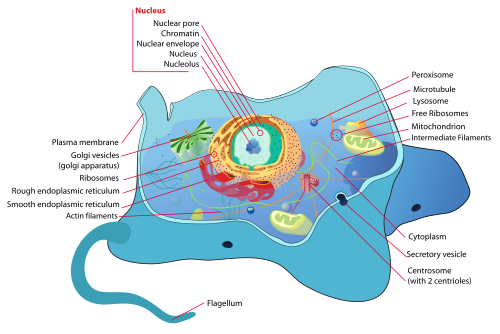

Likewise, the interaction between the cells is highly developed, not the least keeping in mind that the chemical cell machinery must at all stages be able to self-repair. It is also grown, unlike a human-made machine in the macro world assembled from ready-made pieces, all animals and all their parts must be made from tiny single cells that collect nutrients and out of them build bigger structures.
And everything is controlled by the laws of physics and long self-replicating double-helix strands of 4-character code that specifies what happens when.
It is simply amazing.
Friday, June 17, 2011
3D in the browser
We've recently done a project where we needed to do 3D visualizations in the browser. It's not incredibly fancy, mostly showing walls and floors of rooms and some stuff in them.
Before we started coding, we were discussing what platform to run it on. After some going back and forth, we ended up deciding that despite the 3D requirement, going for a web app would probably pay off in the long run because we then don't have the hassle of installed software and perhaps worse, the problem of predicting what particular platform Microsoft will declare obsolete next year.
So in the end, we settled on the web, going for HTML and canvas for the 2D part and WebGL, the new OpenGL standard for the web, for the 3D.
There's only one problem, WebGL was so new that at the time, only Chrome had a release with support. Not long after, Firefox joined the ranks. But still, it's a technology you can't rely on unless you can control the user base and ensure they install the right browser.
Similar problems kept the 2D HTML canvas back until a project like excanvas turned up. Until Internet Explorer support is there, new standards are a no-go for many.
Thus Martin has been working on and has now released JebGL, a WebGL emulation layer for older browsers and most importantly Internet Explorer, back to IE 6.
It relies on the OpenGL support in Java, translating WebGL calls into JOGL calls in a Java applet. We've had a look at other options, such as using the Flash 3D API, but we needed support for some of the fancy stuff in OpenGL so it would be a pretty huge task to try to emulate that in a completely different API (on a lower level, that's what Google is doing with the ANGLE project to try to work-around bad OpenGL drivers).
So as long as Java is in, you can now rely on WebGL (well, barring bugs and missing features in JebGL). And if Java is not there, there's at least the option of asking people to install it, most browsers seem to handle that gracefully these days, rather than requiring them to switch to a completely different browser.
Before we started coding, we were discussing what platform to run it on. After some going back and forth, we ended up deciding that despite the 3D requirement, going for a web app would probably pay off in the long run because we then don't have the hassle of installed software and perhaps worse, the problem of predicting what particular platform Microsoft will declare obsolete next year.
So in the end, we settled on the web, going for HTML and canvas for the 2D part and WebGL, the new OpenGL standard for the web, for the 3D.
There's only one problem, WebGL was so new that at the time, only Chrome had a release with support. Not long after, Firefox joined the ranks. But still, it's a technology you can't rely on unless you can control the user base and ensure they install the right browser.
Similar problems kept the 2D HTML canvas back until a project like excanvas turned up. Until Internet Explorer support is there, new standards are a no-go for many.
Thus Martin has been working on and has now released JebGL, a WebGL emulation layer for older browsers and most importantly Internet Explorer, back to IE 6.
It relies on the OpenGL support in Java, translating WebGL calls into JOGL calls in a Java applet. We've had a look at other options, such as using the Flash 3D API, but we needed support for some of the fancy stuff in OpenGL so it would be a pretty huge task to try to emulate that in a completely different API (on a lower level, that's what Google is doing with the ANGLE project to try to work-around bad OpenGL drivers).
So as long as Java is in, you can now rely on WebGL (well, barring bugs and missing features in JebGL). And if Java is not there, there's at least the option of asking people to install it, most browsers seem to handle that gracefully these days, rather than requiring them to switch to a completely different browser.
Monday, May 30, 2011
Organizational patterns
We went to a seminar not too long ago in a local interest group on agile software development. One of the speakers was Jim Coplien. He's a good at it, speaking emphatically on what to do and not to do.
Also he had the interesting point that if you're going to try to change what a software development organization is doing, process improvement programmes turn out to be less effective than one thinks because processes tend to come from the underlying structures. So if you don't change them, people fall back after some time.
For instance, if you have the problem that the developers aren't good enough at coming up with what the users need, then instead of installing a process where they must fill in check lists to try to force them to listen, maybe you need to look at the fact that they aren't communicating directly with the users, but perhaps through a manager who dictates what should happen. If you change the manager's role, maybe the rest will follow automatically.
Anyway, he talked at some length about some organizational patterns he and others have come up with, which was interesting because many of the seem to describe what we're doing at IOLA. He's collected a big bunch in a book he's written (together with Neil B. Harrison), "Organizational Patterns of Agile Software Development".
If you're interested in software development and what works when you structure the work, the team and relationships to stakeholders and users, it's worth a read.
What's interesting in it is that most patterns may be profound in their effect, but are really lightweight in what you actually need to do. For instance, if you have the problem that developers are interrupted too much, you can sacrifice one person and make him a firewall that people have to go through. Simple as that. No big piles of lists and specifications and meeting minutes and memos necessary.
I think the big downside of the book is that it's not very friendly written. It's in the style of a reference in many places with only little background rationale and so many crossreferences that you need to have read most of the book to understand what's going. This probably works well for Jim Coplien when he travels around on his research and consultancy campaign to fix sick organizations, but I think the audience for a gentler style would be much higher.
Still, it has material I haven't seen elsewhere and it's actually based on research on succesful software teams rather than just handwaving.
Also he had the interesting point that if you're going to try to change what a software development organization is doing, process improvement programmes turn out to be less effective than one thinks because processes tend to come from the underlying structures. So if you don't change them, people fall back after some time.
For instance, if you have the problem that the developers aren't good enough at coming up with what the users need, then instead of installing a process where they must fill in check lists to try to force them to listen, maybe you need to look at the fact that they aren't communicating directly with the users, but perhaps through a manager who dictates what should happen. If you change the manager's role, maybe the rest will follow automatically.
Anyway, he talked at some length about some organizational patterns he and others have come up with, which was interesting because many of the seem to describe what we're doing at IOLA. He's collected a big bunch in a book he's written (together with Neil B. Harrison), "Organizational Patterns of Agile Software Development".
If you're interested in software development and what works when you structure the work, the team and relationships to stakeholders and users, it's worth a read.
What's interesting in it is that most patterns may be profound in their effect, but are really lightweight in what you actually need to do. For instance, if you have the problem that developers are interrupted too much, you can sacrifice one person and make him a firewall that people have to go through. Simple as that. No big piles of lists and specifications and meeting minutes and memos necessary.
I think the big downside of the book is that it's not very friendly written. It's in the style of a reference in many places with only little background rationale and so many crossreferences that you need to have read most of the book to understand what's going. This probably works well for Jim Coplien when he travels around on his research and consultancy campaign to fix sick organizations, but I think the audience for a gentler style would be much higher.
Still, it has material I haven't seen elsewhere and it's actually based on research on succesful software teams rather than just handwaving.
Friday, April 8, 2011
GNOME 3 is nice
So GNOME 3 is out and I decided to give it a try with the Fedora live CD (or should I say USB stick). I must say I'm impressed. Overall it's really clean and just works. The new application chooser is downright brilliant compared to the old menu. I've tested some of the previews of GNOME Shell, and the thing has come a long way.
Of course, Alt-tab is still broken, the default (and only) theme is a bit top-heavy, window movement wasn't quite smooth on Intel GMA 950, there was the occasional crash of the new settings stuff, but all in all not bad for a .0 release. And the new direction means that there are now people working on the core user experience, something that appears to have been more or less neglected for a very long time.
Plus much of the new shell stuff is written in Javascript so should be easy to hack on in case the designers don't come to their senses any time soon (there's already an Alt-tab hack).
Of course, Alt-tab is still broken, the default (and only) theme is a bit top-heavy, window movement wasn't quite smooth on Intel GMA 950, there was the occasional crash of the new settings stuff, but all in all not bad for a .0 release. And the new direction means that there are now people working on the core user experience, something that appears to have been more or less neglected for a very long time.
Plus much of the new shell stuff is written in Javascript so should be easy to hack on in case the designers don't come to their senses any time soon (there's already an Alt-tab hack).
Subscribe to:
Posts (Atom)